What Is Shadow IT and What Security Teams Need to Know Before It Becomes a Breach

Shadow IT has become one of the most common blind spots in cybersecurity. It happens when employees, departments, or contractors use apps, devices, cloud services, browser extensions, AI tools, or personal accounts without approval from IT or security. The intent is often productivity, but the result can be unmanaged access, weak logging, unknown data storage, and security gaps that no one is watching.
For CISOs and security teams, Shadow IT creates a hard problem. The business wants speed. Employees want tools that make work easier. IT teams want visibility, governance, and control. When those needs do not align, people create workarounds.
A sales team may use an unapproved CRM trial to manage leads. A marketing team may upload customer data to a free design or automation tool. A developer may connect a personal productivity app to company email. A senior executive may use a private messaging app for business decisions. None of these actions may be malicious, but each one can move company data outside approved controls.
Why Shadow IT Keeps Growing
Shadow IT usually starts with a simple business need. The approved tool may be too slow, too restrictive, too expensive, or missing a feature the team needs. In some cases, the internal approval process takes weeks, so employees choose a faster route.
This is why blocking every unapproved tool rarely works. Heavy restrictions can push users toward hidden behavior, while better guardrails can bring risky usage into view. Security teams need to understand why employees are using these tools before deciding what to approve, monitor, restrict, or replace.
The rise of SaaS has made the issue harder. A department can now buy a tool with a credit card, create accounts with corporate emails, invite external users, and start storing data before IT knows the tool exists. Add personal devices, unmanaged browser extensions, file-sharing tools, messaging apps, and AI assistants, and the attack surface grows quickly.
Teams like HawkEye exist precisely because this kind of unmanaged sprawl has become a normal part of the modern attack surface, not an edge case.
Common Examples of Shadow IT
Shadow IT rarely looks dramatic. It usually looks like ordinary convenience:
- File-sharing tools like personal Dropbox or Google Drive accounts used to move work documents.
- Messaging apps such as WhatsApp or personal Slack workspaces used for quick coordination.
- Browser extensions installed for productivity that quietly collect data in the background.
- SaaS subscriptions purchased on a company card without IT ever being looped in.
- Personal devices used to check email or access company systems outside of any mobile management policy.
Each item on its own looks small. Stacked across hundreds of employees over several years, it becomes an inventory nobody has ever fully mapped.
The Real Risks Behind Shadow IT
Lack of visibility. You cannot secure what you cannot see. Unapproved apps and unmanaged devices create blind spots IT has no way to patch, monitor, or audit. If a breach happens through one of these tools, the security team may not even know the tool exists until well after the damage is done.
A bigger attack surface. Every unsanctioned app, extension, or personal device is another door into the business. Attackers rarely need to break through a strong front gate when a forgotten side door sits wide open. Shadow IT hands attackers exactly that kind of opening, often without a single alert ever firing.
Data leaving the building. Employees move company data into personal accounts without realizing the exposure. A file uploaded to a personal cloud drive, a spreadsheet exported to a home email account, or a customer list stored in an unapproved CRM can all end up outside the company’s control and outside its ability to protect.
Compliance gaps. Regulations such as GDPR, HIPAA, and SOC 2 require organizations to know where sensitive data lives and who can access it. Shadow IT breaks that chain of custody. Auditors cannot verify controls on tools they were never told about, and that gap can turn into fines or a failed audit.
Password and access sprawl. Apps adopted outside IT rarely connect to single sign-on. Employees end up with separate logins, often reusing the same password across multiple services. One breached account on an obscure tool can become the entry point into far more sensitive systems.
Shadow AI has made the problem sharper
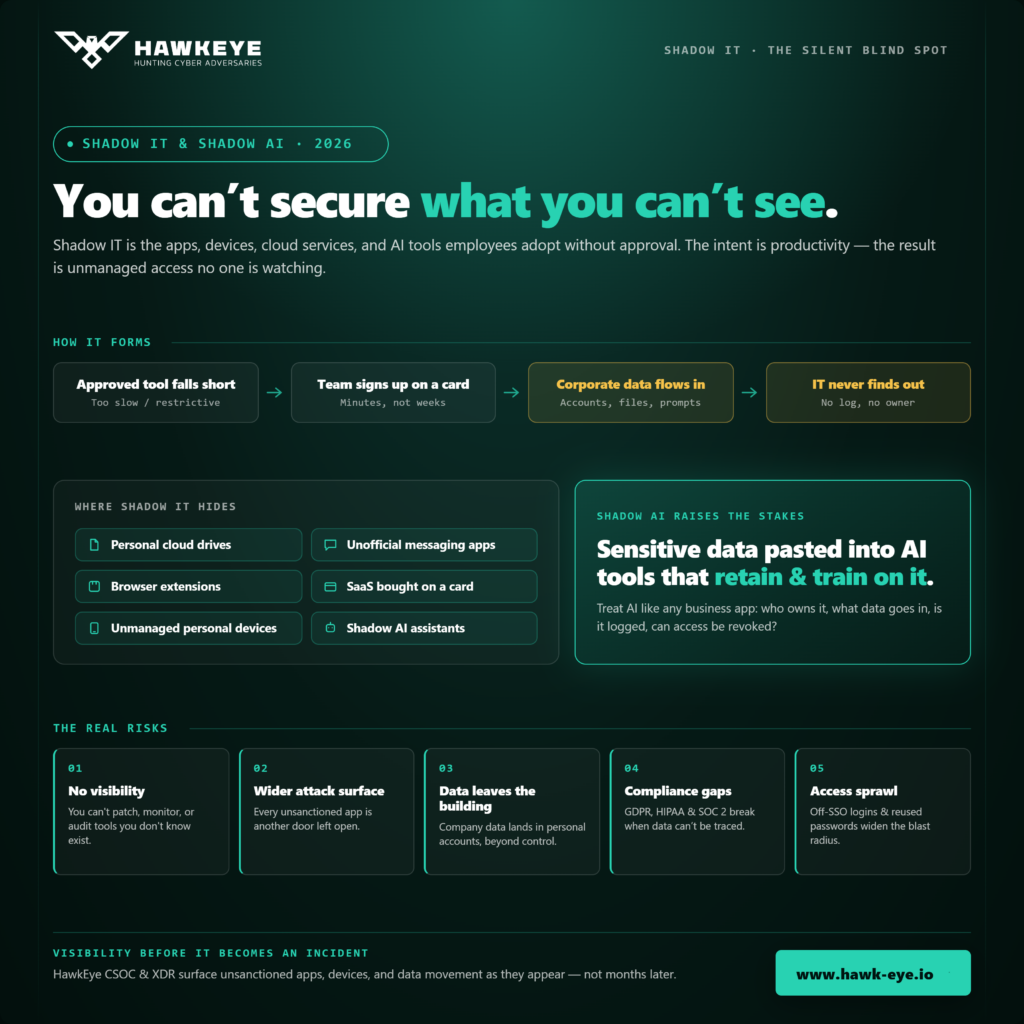
Shadow IT now includes Shadow AI. Employees may paste sensitive content into AI tools for summaries, proposals, code reviews, analysis, or meeting notes. Some tools retain prompts, train on user input, or connect with third-party plugins. Even when the tool is useful, the data handling risk must be assessed.
Security teams should treat AI tools like any other business application. Who owns the account? What data can be entered? Is enterprise privacy available? Are logs retained? Can access be revoked? Does the tool integrate with corporate identity? Can the organization review usage during an incident?
The goal is not to stop innovation. The goal is to prevent sensitive data from flowing through tools with no review, no owner, and no monitoring.
Why Blocking Everything Does Not Work
The instinct to lock everything down is understandable, but heavy-handed blocking usually backfires. Employees who feel restricted find workarounds. They switch to personal devices, use browsers instead of managed apps, or simply stop reporting what they use. The result is less visibility, not more. Punitive controls also tend to damage trust between IT and the rest of the business, which makes future cooperation harder to rebuild. A workable approach treats shadow IT as a visibility and communication problem first, and a blocking problem only where it is genuinely needed.
How to Get Ahead of Shadow IT
Build a real inventory. You need visibility into every device, app, and cloud service connecting to company data, not just the ones on an approved list. Continuous monitoring through a managed detection service, such as HawkEye’s CSOC and XDR platform, gives security teams the asset and traffic visibility needed to spot unsanctioned tools as they appear rather than months later.
Talk to employees before punishing them. Most shadow IT comes from a genuine gap between what people need and what IT has provided. Find out what problem the unapproved tool was solving, then either sanction a safer alternative or explain the specific risk in plain terms.
Shorten the approval process. If getting a new tool approved takes weeks, people will stop asking. A short, clear intake process removes the main reason employees go around IT in the first place.
Enforce access control where it counts. Single sign-on, multi-factor authentication, and device compliance checks limit what an unmanaged tool can actually reach, even if someone starts using it before it gets approved.
Watch for unusual data movement. Large uploads to unfamiliar destinations, spikes in personal email traffic, or new SaaS logins from unmanaged devices are often the first sign of shadow IT in action. Behavioral monitoring catches these patterns long before a formal audit would.
Monitor continuously, not once a year. Shadow IT changes constantly as new apps launch and employee habits shift. A one-time audit goes stale within weeks. Ongoing detection and response, rather than a single snapshot review, is what keeps the inventory accurate.
Where HawkEye fits
Shadow IT is a visibility problem before it becomes an incident. HawkEye helps organizations improve detection and response by monitoring digital assets, correlating security events, and supporting managed security operations through its CSOC and XDR capabilities.
For organizations that need 24×7 monitoring, HawkEye CSOC and XDR can help security teams detect unusual behavior, monitor privileged activity, track third-party access, support attack surface management, and improve incident triage. These capabilities are important when Shadow IT creates identity, endpoint, cloud, or SaaS signals that would otherwise be missed.
Endpoint visibility also matters. The HawkEye XDR Agent supports device inventory, vulnerability assessment, log collection, forensic investigation, file integrity monitoring, and automated containment actions. This helps security teams move from guessing to evidence-based investigation when unmanaged tools or suspicious user activity appear.
For teams comparing detection models, the HawkEye blog on XDR vs SIEM vs MDR is also useful because Shadow IT requires visibility, audit trails, correlation, and response support across more than one control layer.
The Bottom Line
Shadow IT is not going away. Remote work, cheap SaaS tools, and employees who just want to move fast all but guarantee it. The organizations that manage it well are not the ones that ban everything. They are the ones that pair strong visibility with clear communication and ongoing monitoring, so unapproved tools get caught and addressed before they turn into an incident. Treat shadow IT as a continuous discipline rather than a one-time cleanup, and it stops being a hidden liability and starts being a manageable part of the security program.